Trikaan
  • Anvaya

    AnvayaConnected business operations - supply chain, sales, finance, HR and more on one platform.

    Anvaya apps

    Overview →

    Supply Chain & Operations

    Procure MarketplaceProcureInventoryWarehouseProductionQualityLogistics

    Commercial Operations

    Sales E-comSalesTicketing

    Financial Management

    LedgerGSTDocuments

    Workforce Management

    HRContractorsAudit LogsEmployee Portal

    Customer Engagement

    Customer SupportConnectAnnouncements

    Business Administration

    Users & RolesWeighbridgeManage VisitorQR Scan

    Intelligence & Platform

    DashboardAstra AI

    ASTR AI Suite

    ASTR ProductionProduction intelligence - recipes, smart BOM, costing, planning and quality.Astr AIThe AI layer across every Trikaan product - ask, analyse and automate in plain language.ASTR Drawing & Plan GeneratorTurn customer drawings into BOM, BOQ, cutting lists and production plans.ASTR Reporting AssistantAsk in plain language - get reports in Excel, PDF, CSV or PPT.Machine Digital TwinLive machine models connected to PLC & SCADA data for OEE and maintenance.

    Agriculture

    Seed TrackField intelligence for seed production - growers, fields, visits, QA and yield.
    Not sure which product fits your business?Book a Demo →
  • Industries

    FurnitureFrom concept to engineering, powered by AI.FMCGFrom product planning to market execution.PharmaceuticalFrom formulation to compliance.AutomotiveFrom component design to vehicle manufacturing.Food & BeverageFrom ingredients to finished products.ConstructionFrom project planning to execution.ChemicalFrom chemical formulation to process optimisation.Agri & SeedFrom grower’s field to sealed seed bag.
    Industry-specific solutions. Powered by ASTR.All industries →
  • Build & Integrate

    Software built around your process

    Workflow Digitisation & OptimisationCustom Application DevelopmentERP & Systems IntegrationMobile & Field ApplicationsData Migration & Legacy Modernisation

    Engineering & Automation

    From drawings to the shop floor

    Drawing-to-Production EngineeringPLC, SCADA & Hardware IntegrationDigital Twin & 3D Plant ModellingPredictive Maintenance & OEEAI Reporting & Analytics

    Operations

    Run the business on connected data

    Procurement & Supply ChainInventory & Warehouse SolutionsProduction Planning & SchedulingQuality & Compliance SystemsCosting & Margin Intelligence

    Industry Services

    Industry-focused services

    Manufacturing SolutionsAgri & Seed SolutionsConstruction & Interior SolutionsImplementation, Training & Support
    Beyond software - we engineer around your business.All services →
  • Engineering

    How We WorkEngineeringData SecurityData PrivacyCloud & Hosting

    Your vision. Our engineering.

    Explore our engineering capabilities →
  • Pricing
  • FAQ
Book a Demo
  • Home
Trikaan

Your Business. Connected Through Intelligence.

Products

  • Anvaya
  • ASTR Production
  • Astr AI
  • ASTR Drawing & Plan Generator
  • ASTR Reporting Assistant
  • Machine Digital Twin
  • Seed Track

Industries

  • Furniture
  • FMCG
  • Pharmaceutical
  • Automotive
  • Food & Beverage
  • Construction
  • Chemical
  • Agri & Seed

Services

  • All services
  • Workflow Digitisation & Optimisation
  • Custom Application Development
  • ERP & Systems Integration
  • Mobile & Field Applications
  • Data Migration & Legacy Modernisation
  • Drawing-to-Production Engineering
  • PLC, SCADA & Hardware Integration
  • Digital Twin & 3D Plant Modelling
  • Predictive Maintenance & OEE
  • AI Reporting & Analytics
  • Procurement & Supply Chain
  • Inventory & Warehouse Solutions
  • Production Planning & Scheduling
  • Quality & Compliance Systems
  • Costing & Margin Intelligence
  • Manufacturing Solutions
  • Agri & Seed Solutions
  • Construction & Interior Solutions
  • Implementation, Training & Support

Engineering

  • How We Work
  • Engineering
  • Data Security
  • Data Privacy
  • Cloud & Hosting
  • Network Security & VPN

Company

  • Who we are
  • Pricing
  • FAQ
  • Careers
  • Blog
  • Contact

Apps

  • Procure Marketplace
  • Procure
  • Inventory
  • Warehouse
  • Production
  • Quality
  • Logistics
  • Sales E-com
  • Ticketing
  • Ledger
  • GST
  • Documents
  • HR
  • Audit Logs
  • Customer Support
  • Connect
  • Announcements
  • Users & Roles
  • Weighbridge
  • Manage Visitor
  • QR Scan
  • Dashboard
  • Astra AI

© 2026 Trikaan Solutions Pvt. Ltd. All rights reserved.

Privacy PolicyTerms of ServiceCookie Policy
Services›Production Planning & Scheduling

Production Planning & Scheduling

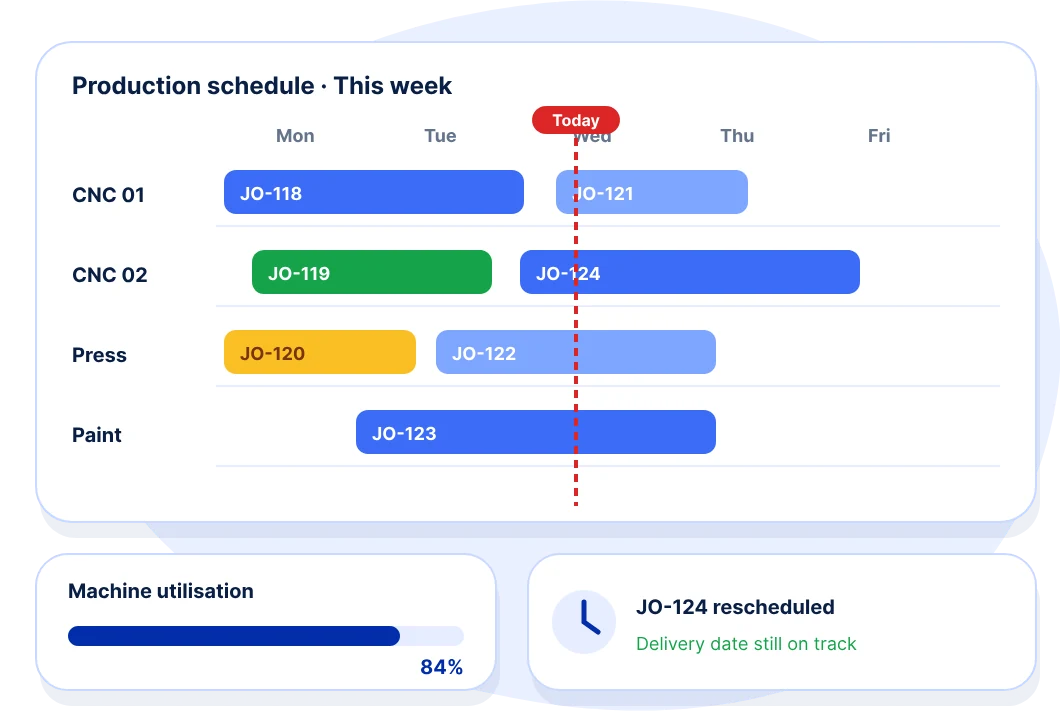
We build production planning and scheduling systems that plan jobs against real machine capacity, material availability and delivery dates.

When an order changes or a machine goes down, the schedule updates and your team sees the impact on every other order before committing dates to customers.
Discuss your problem What we deliver
Illustration of a weekly production schedule by machine with a utilisation bar and a rescheduled job card
“We plan in the morning, and by afternoon the plan no longer matches the shop floor.”

Does your business work this way?

  • Delivery dates are promised without checking capacity.

  • The schedule lives in a spreadsheet that one person maintains.

  • Machines sit idle and get overloaded in the same week.

  • Urgent orders disrupt everything else without visibility.

  • Material is not ready when the job is due to start.

  • Nobody can say with confidence when an order will be completed.

Plans your shop floor can actually follow.

  • 01

    Capacity planning

    Plan production against available machines, shifts and people.

  • 02

    Material readiness

    Confirm material availability before a job is released.

  • 03

    Visual scheduling

    See jobs on a timeline by machine, line or work centre.

  • 04

    Rescheduling

    Adjust plans quickly when orders, priorities or capacity change.

  • 05

    Delivery commitments

    Give customers dates based on real capacity and backlog.

  • 06

    Plan versus actual

    Compare planned and actual output to improve every next plan.

A plan that updates from the shop floor.

When machines are connected through PLC and SCADA, actual output and downtime feed straight into the plan. You see the real position of every order without waiting for supervisors to report.

  • 01

    Live output

    Completed quantities update the schedule as production happens.

  • 02

    Downtime alerts

    Stoppages show their impact on upcoming jobs immediately.

  • 03

    ASTR AI insights

    Patterns in delays and capacity highlighted for the next plan.

How this engagement runs.

  1. Phase 1

    Model capacity

    Machines, routes and standard times captured.

  2. Phase 2

    Plan a line

    Scheduling piloted on one line or section.

  3. Phase 3

    Plant-wide

    All lines planned in one view.

  4. Phase 4

    Adhere & improve

    Weekly reviews of plan versus actual.

What changes for your team.

  • One plan everyone sees.
  • Delivery dates you can commit to.
  • Less firefighting when things change.
  • Jobs start with material ready.

Built on

  • ASTR ProductionRecipes, BOMs, work orders, job cards
  • Machine Digital Twin3D/2D twin with PLC and SCADA
  • AnvayaConnected business operations

Related services

  • Manufacturing Solutions
  • Maintenance & OEE

How We Build Your Production Plan.

We start by understanding your business from the ground up, analysing existing workflows, identifying challenges and uncovering opportunities for improvement. We then design the solution architecture, review it with your team, gather feedback and approvals, and only then move into engineering, implementation and continuous improvement.

  1. 1

    Understand your business

    Step 01 · Discover

    We start from the ground up, learning how your business really works today.

    Understand your business illustration
  2. 2

    Analyse workflows

    Step 02 · Analyse

    We study existing workflows, identify challenges and uncover opportunities for improvement.
    Analyse workflows illustration
  3. 3

    Design the architecture

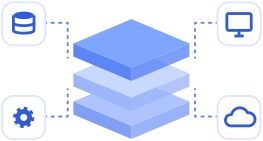
    Step 03 · Design

    We design the solution architecture around your requirements and processes.
    Design the architecture illustration
  4. 4

    Review & approve

    Step 04 · Align

    We review the design with your team, gather feedback and get approval before we build.

    Review & approve illustration
  5. 5

    Engineer & implement

    Step 05 · Build

    Development, integration, testing, deployment and onboarding.

    Engineer & implement illustration
  6. 6

    Improve continuously

    Step 06 · Evolve

    We keep refining the solution as your operations and requirements evolve.

    Improve continuously illustration

We don't build first and understand later. We understand first, design together and build what your business actually needs.

Book a Demo

Let's talk about your operations.We Love Talking Tech and Business.

Whether you're ready to onboard or just exploring - drop us a message. We respond within one business day.

Email
info@trikaan.com
Phone
+91 90362 22022
Office
657/23, 13 Cross, Asha Township, Doddagubbi, Hennur Road
Bengaluru, Karnataka 560077, India
Follow us